
UV Printer Maintenance Habits That Protect Quality and Consistency
Are You Struggling to Maintain Consistent UV Printing Quality?
If you've invested in a UV printer, you know how crucial consistent, high-quality output is for your business or hobby. But many operators face issues like color inconsistencies, print defects, or equipment breakdowns that seem to crop up without warning. Have you wondered what habits or routine checks can help protect your investment and ensure your prints stay sharp and reliable?
Understanding proper maintenance habits isn't just about fixing problems — it"s about *preventing* them. Regular care and smart operational routines can significantly extend your equipment"s lifespan, keep your colors vibrant, and minimize downtime.
Why Proper UV Printer Maintenance Matters
UV printers are sophisticated devices that require attention beyond simple cleaning. They handle tricky inks, delicate components like print heads, and high-precision electronics. Neglecting maintenance can lead to issues such as clogged nozzles, uneven curing, or even costly hardware failures. Regular habits ensure every component functions optimally, protecting your print quality and consistency over time.
Daily UV Printer Maintenance Habits
In the fast-paced world of printing, forming a daily routine is the first step towards reliable operation. Here are essential habits that can dramatically improve your results:
- Wipe down the print bed and surrounding areas to remove dust, fibers, or ink residue that could affect print adhesion or cause blemishes. Use a lint-free cloth and appropriate cleaning solution.
- Inspect the print heads visually for signs of clogging or ink buildup. Early detection helps prevent costly nozzles from clogging during high-volume runs.
- Check for ink flow issues by observing how the ink cartridges or tanks are dispensing ink. Consistent ink flow prevents color inconsistencies and print defects.
- Clean the exterior and paper feed areas to avoid paper jams or debris contaminating prints. Keep the area tidy to promote smooth operation.
Implementing these simple daily checks can be the difference between a smooth, profitable print job and a problematic one.
Weekly UV Printer Maintenance Routines
Beyond daily habits, weekly maintenance should focus on deeper cleaning and checks:
- Perform print head cleaning protocols, using manufacturers-approved cleaning cartridges or solutions. Don"t overdo it—excessive cleaning can wear out nozzles.
- Inspect UV LED or mercury lamps for signs of wear or dirt. Dirty or aged lamps reduce curing efficiency, leading to smudges or poor adhesion.
- Clean the pump filters and ink lines to prevent ink thickening or clogging.
- Check alignments and calibrations to make sure the print head is properly aligned, which is crucial for sharp images and uniform color application.
- Update firmware and software, if available, to improve performance and fix bugs that might affect print quality.
This routine helps catch issues early, ensuring your printer remains in top shape.
Monthly Deep Maintenance and Checks
Once a month, it's worth diving deeper into your equipment. The goal: prevent major failures and fine-tune your printer:
- Perform a comprehensive cleaning of all moving parts, such as sliders, rails, and rollers, to keep motion smooth and accurate.
- Replace or clean filters and check ink cartridges or bulk ink systems for proper operation.
- Check the electrical connections and cables for wear or looseness. Faulty wiring can cause intermittent issues or damage components.
- Calibrate the color profiles and print bed to ensure the most accurate color reproduction and sharp details.
- Run test prints periodically to verify that everything"s functioning as expected and identify potential problems early.
Consistency in maintenance routines translates to consistent print results—something every professional strives for.
Practical Tips for Protecting Your UV Printer"s Quality and Longevity
Beyond routine cleaning, consider these additional practices:
- Use high-quality inks and consumables that are compatible with your machine. Lower-quality inks can clog nozzles and accelerate wear.
- Keep your workspace controlled, with stable temperature and humidity levels to prevent ink drying issues or material warping.
- Properly turn off and store your printer after use. Use the shutdown procedures recommended by the manufacturer to protect delicate components.
- Educate your staff or yourself on correct operation techniques, such as loading media properly and avoiding abrupt movements.
- Schedule regular professional inspections if possible. Sometimes expert calibration or deep cleaning can save money and time in the long run.
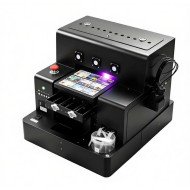
Adopting these habits ensures your UV printer continues to produce sharp, vibrant images consistently and reduces costly repairs. If you're looking for a reliable UV printing solution, check out the spot UV printing machine that can meet your high standards.
FAQs on UV Printer Maintenance
1. How often should I clean my UV printer's print heads?
Typically, clean the print heads after every 10-15 hours of operation or when you notice print quality decline. Always follow the manufacturer"s recommendations.
2. Can I use any cleaning solution for my UV printer?
No, always use solutions or cartridges recommended by your printer's manufacturer. Using improper cleaners can damage the nozzles or other components.
3. What are signs that my UV lamp needs replacement?
If you notice decreased curing effectiveness, faster filament or ink buildup, or uneven curing, it might be time to replace the lamp. Check the manufacturer"s lifespan recommendations.
4. How can I improve the longevity of my UV printer?
Consistent routine maintenance, using quality consumables, proper storage, and timely repairs all contribute to longer machine life.
5. Is professional maintenance necessary?
While routine checks can be done in-house, periodic professional servicing can catch issues early and optimize performance, especially for high-volume shops.











Leave a Comment