
Ultimate Guide to UV Printers: How They Transform Printing Technologies
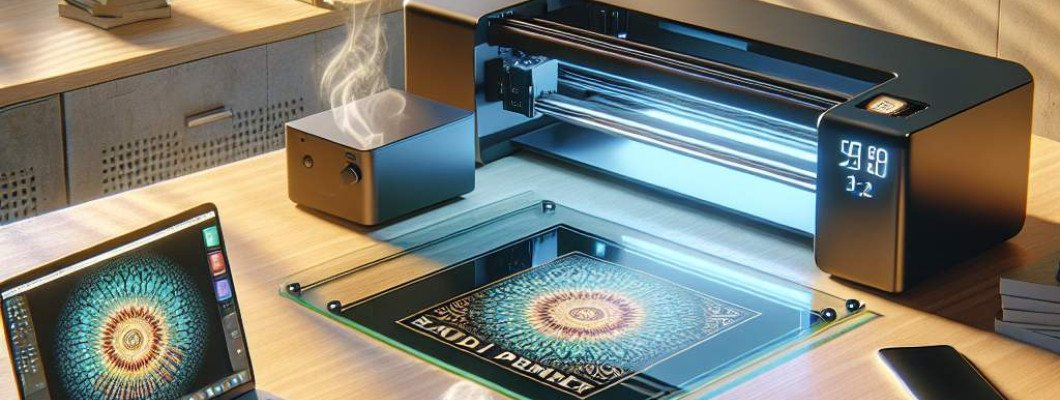
Are you struggling to find a printing solution that combines versatility, durability, and high-quality results? If so, you"re not alone. Many businesses and artists are turning to UV printers to meet their demanding printing needs. But what exactly makes UV printers stand out, and how can they transform your workflow? Let"s dive into the essentials of UV printing technology—what it is, how it works, and why it might be the game-changer you"ve been looking for.
What Is a UV Printer and Why Is It Gaining Popularity?
A UV printer is a type of digital printing machine that uses ultraviolet light to cure or dry ink instantly as it is printed on various surfaces. Unlike traditional inkjet printers, which rely on absorption or drying through heat or air, UV printers utilize UV-sensitive inks that harden immediately upon exposure to UV light. This rapid curing process allows printing on a broader range of materials, from plastic and glass to metal, wood, and even leather.
The advantages of UV printing make it particularly appealing for many industries. For example, custom product manufacturers use UV printers to produce personalized items with sharp, vibrant images, while signage companies rely on their ability to print on unconventional surfaces quickly. The technology"s flexibility, combined with high-speed production, is driving its popularity across sectors.
How Does UV Printing Work?
Understanding the working principle of UV printers reveals why they are so efficient. Here"s a breakdown of the process:
- Design Input: The process begins with a digital file, just like regular print jobs.
- Ink Application: The printer sprays UV-sensitive inks directly onto the surface to be printed.
- UV Curing: Immediately after ink is laid down, a powerful ultraviolet light emits from the printhead, curing the ink in place. This instant drying creates a durable, smudge-proof surface.
- Final Output: The result is a vibrant, high-resolution image bonded tightly to the substrate, resistant to scratching, fading, and environmental wear.
This rapid curing process reduces production time significantly compared to traditional methods, making UV printers highly efficient for volume and custom projects alike.
Key Benefits of UV Printing Technology
Investing in a UV printer can be a game-changing decision for your business. Here are some reasons why:
- Versatility: Print on almost any material—plastic, glass, metal, fabrics, wood, and more—without the need for special coatings.
- Speed: Instant curing reduces wait times, increasing overall productivity.
- High Quality: Achieve sharp detail and vibrant colors with resolutions up to 1200 dpi or higher.
- Durability: Prints are resistant to scratches, UV rays, chemicals, and weathering.
- Cost-Effective for Small Batches: No need for costly setups or screens, making short runs more affordable.
Applications of UV Printing in Different Industries
UV printers are revolutionizing various sectors by allowing customization and production efficiency. Some of the main applications include:
- Signage and Advertising: Produce eye-catching signs, banners, and displays on diverse surfaces with vivid colors and long-lasting durability.
- Product Packaging and Labels: Create detailed labels and packaging art on curved or complex surfaces, adding to branding appeal.
- Interior Design: Print on tiles, glass panels, or furniture components for personalized and artistic decoration.
- Promotional Items: Customize items like mugs, keychains, and phone cases with high-resolution images.
- Art and Craft: Artists use UV printers for unique art pieces that require printing on unconventional materials.
Choosing the Right UV Printer for Your Business
Picking the perfect UV printer involves considering several important factors:
- Print Size: Determine the maximum size of your typical projects to select a suitable printer.
- Print Resolution: Higher resolution models deliver sharper images, essential for detailed work.
- Material Compatibility: Ensure the printer can handle the materials you plan to use.
- Speed and Productivity: Consider your volume needs—some models offer faster throughput for larger batches.
- Maintenance and Support: Opt for brands with robust support networks and user-friendly maintenance procedures.
Tips to Maximize Your UV Printing Efficiency
To get the best results from your UV printer, keep these tips in mind:
- Regular Cleaning: Maintain the printhead and UV light sources for consistent print quality.
- Material Preparation: Ensure surfaces are clean, dry, and suitable for printing.
- Calibration: Regularly calibrate your printer to maintain high accuracy.
- Use Quality Ink: Invest in reputable UV inks; they last longer and produce better colors.
- Experiment: Test different substrates and settings to discover new applications and optimize output.
Are UV Printers Worth the Investment?
In today"s competitive marketplace, a UV printer can offer significant advantages. Its ability to print on diverse materials with high quality and durability not only expands your product offerings but also shortens production cycles. For businesses aiming to stand out through customization, UV printing provides a clear edge.
When thinking about investing, assess your current needs and future growth potential. Many small and medium-sized enterprises find that UV printers pay for themselves quickly thanks to increased flexibility and higher-margin products.
Frequently Asked Questions (FAQs)
1. How durable are UV printed items?
UV printed items are highly durable, resistant to scratches, UV rays, chemicals, and weathering, making them ideal for outdoor or long-term use.
2. Can UV printers print on curved surfaces?
Yes, UV printers are excellent for printing on curved or irregular surfaces due to their precision and ability to print directly onto the substrate.
3. Is UV printing environmentally friendly?
UV inks contain fewer volatile organic compounds (VOCs) and dry instantly, reducing emissions and waste, which makes UV printing more environmentally friendly than some traditional methods.
4. What is the maintenance required for a UV printer?
Regular cleaning of the printhead, replacing UV lamps as needed, and ensuring proper calibration are essential for maintaining optimal performance.
5. How cost-effective is UV printing for small runs?
UV printing eliminates setup costs like screens or plates, making it cost-efficient for short runs and customized projects.















Leave a Comment