Evaluating Infrastructure Integration Challenges for UV Printers

The Industrial Reality Behind Integration
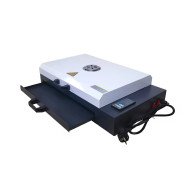
The Smart Mini A4 UV Printer is a technological marvel, yet integration into existing infrastructure remains a challenge. The intricate alignment of UV printing technology with current server-based systems requires a meticulous analysis of several factors.
Technical Deep-Dive
Network Synchronization
Ensuring the Smart Mini A4 UV Printer communicates effectively with network infrastructure involves understanding data latency, packet handling, and bandwidth allocation. The printer uses an avg. of 2.4 Mbps for data transfer, which can affect current systems operating at higher loads.
Thermal Management
Thermal efficiency is critical. The printer outputs 120W during peak operation, impacting the cooling requirements of server racks, typically operating within a 10 kW threshold per rack.
Hardware Compatibility
Compatibility with existing hardware involves drivers that support UV technology. Current servers running OS versions earlier than 2018 might require updates to seamlessly incorporate the printer's advanced functions.
Power Supply Considerations
The power consumption of 150W necessitates a reevaluation of existing electrical layouts, often designed for lower-wattage devices.
Security Protocols
Integrating printers with sensitive data pathways needs robust security protocols. Advanced encryption measures must be deployed, typically AES 256-bit, to ensure data integrity.
| Technical Path | Implications |
|---|---|
| Legacy Systems | Higher integration costs, potential need for retrofitting |
| Modern Infrastructure | Smoother integration, lower long-term costs |
Scenario Analysis
Consider a medium-sized business looking to add the Smart Mini A4 UV Printer into their infrastructure. Three distinct scenarios arise...
Scenario 1: Full Modernization - Businesses with up-to-date infrastructure face minimal hurdles with seamless integration. ROI increases by approx. 15% due to efficient operations.
Scenario 2: Partial Upgrade - Firms with hybrid systems can integrate at a moderate cost but might face initial downtime.
Scenario 3: Legacy Systems - Older infrastructure requires substantial investment, increasing initial outlay, yet this lays groundwork for future tech incorporation.
Expert FAQ
Q1: Does UV technology necessitate specific environmental conditions?
A1: Yes, UV printers typically require temperature and humidity control within specific ranges for optimal performance, usually 20-25°C and 40-60% RH.
Q2: Are there specific network configurations necessary for UV printers?
A2: Adequate bandwidth and low latency networks are crucial; configurations should prioritize traffic to avoid delays.
Q3: What impact does UV ink have on maintenance?
A3: UV ink is durable, reducing the frequency of maintenance compared to conventional inks, but requires regular cleaning of printheads.
Q4: How does integration affect operational scalability?
A4: Proper integration increases scalability, making it easier to add units without extensive reconfigurations.
Q5: What are the typical failure points in UV printers?
A5: Common issues include printhead clogging and alignment issues, generally mitigated through regular maintenance.
Strategic Verdict
In the realm of industrial printing, the Smart Mini A4 UV Printer represents significant potential when integrated judiciously. Its impact on operational efficiency and capacity is profound, contingent upon alignment with current technological infrastructures.