
Innovative Printing Solutions for Fashion & Manufacturing
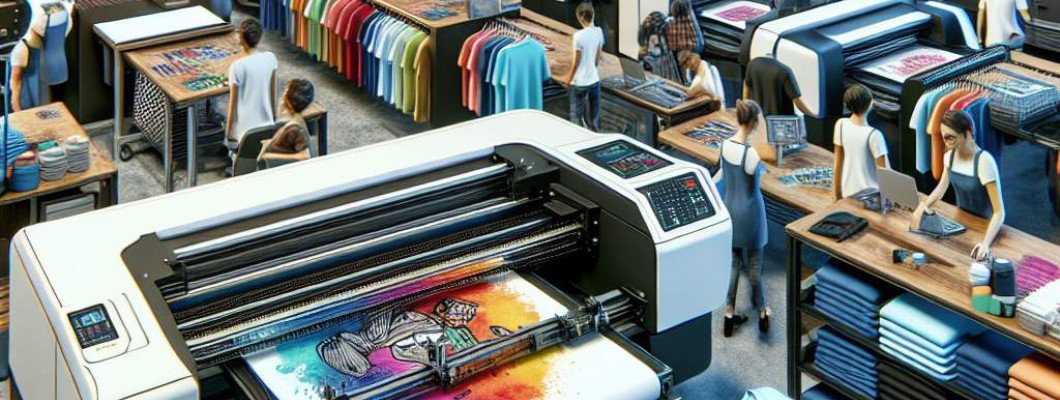
Are You Struggling to Find the Perfect Printer for Your Custom T-Shirt Business?
If you're dabbling in custom apparel or looking to scale your t-shirt or textile printing, choosing the right printer can feel overwhelming. You've probably heard about different options like screen printing, heat transfer, or traditional inkjet printers. But lately, the **a3 dtg printer** and **a3 t-shirt printer** have been gaining serious traction for their quality and efficiency. I recently talked with a friend who started a small shop — he switched to an A3 DTG printer and saw his production speed and quality skyrocket. It"s not magic; it"s smart tech that simplifies your workflow and boosts your output.
What Exactly Is an a3 DTG Printer and Why Do You Need One?
Understanding Direct to Garment (DTG) Printing
DTG printing stands for "Direct to Garment," and it"s a revolutionary process. Think of it as an inkjet printer, but for fabric. Instead of transferring ink onto paper, it applies ink right onto your textiles. The **a3 dtg printer** specifically refers to a model that handles A3-sized prints comfortably. This size is perfect for printing detailed designs, logos, and images directly onto T-shirts and other apparel.
Why the A3 Size is a Game Changer
- Versatility: You can print both small logos and detailed artworks.
- Efficiency: Less waste and faster turnaround times.
- Cost-effective: Smaller size means lower initial investment.
For small to medium businesses, the a3 DTG offers the perfect balance of capacity and affordability. Plus, since it"s compact, it fits comfortably in a typical workspace, making setup less of a headache.
The Power of the a3 T-Shirt Printer in Your Workflow
Design Flexibility and High-Quality Output
The **a3 t-shirt printer** doesn't just print; it creates eye-catching, vibrant designs that stand out. Thanks to advanced print heads and ink formulations, you get sharp images with smooth color gradients, perfect for detailed artwork or photographs. It's ideal for custom apparel shops, promotional merchandise, or even small fashion lines.
Ease of Use and Maintenance
Many users tell me that modern a3 t-shirt printers are surprisingly user-friendly. Features like automated cleaning, easy ink refill systems, and intuitive controls make operation straightforward. That means less downtime and more time creating.
Key Features That Make a3 DTG and T-Shirt Printers a Wise Investment
- High-resolution printing: Achieves detailed and vibrant images.
- Fast printing speeds: Saves time on larger orders.
- Multiple ink channels: For rich colour range and durability.
- Compact design: Fits into small studios or workshops comfortably.
- Low maintenance: Built to keep your workflow smooth without frequent repairs.
Imagine printing a batch of custom T-shirts for an event — switching from one design to another should be quick and seamless. These printers make that possible.
Factors to Consider When Choosing Your a3 DTG or T-Shirt Printer
Budget and Price Range
Start by setting a budget. Entry-level models are affordable but may lack certain features, while high-end ones give you more speed and color options. Remember, investing a little more now can save you headaches later.
Print Quality and Resolution
Look for printers with at least 720 dpi resolution. Higher resolution means detailed and professional-looking prints that stand out on the fabric.
Supported Ink Types and Cost of Consumables
Most printers use water-based pigment inks, which are eco-friendly and produce vibrant colours. Check the cost and availability of inks — this impacts your ongoing expenses.
Ease of Maintenance and Support
A reliable supplier offering good technical support and training can make all the difference. Regular maintenance ensures your printer remains in top condition and extends its lifespan.
How to Maximise Your Investment in an a3 Printer
- Start with quality designs: Even the best printer can"t produce great prints without good artwork.
- Clean your printer regularly: Follow manufacturer guidelines to avoid clogs and colour inconsistencies.
- Use compatible inks: Confirm they're suited for your model to prevent damage and ensure colour fidelity.
- Experiment with pre-treatment: Proper fabric pre-treatment improves ink adhesion and durability.
- Keep learning: Stay updated on new techniques, software, and accessories that can improve your workflows.
When I helped a newbie startup, we found that paying attention to pre-treatment and ink quality made their designs look sharper and last longer. It"s those small tweaks that really add up.
Want to See One in Action? Check Out Our Product Link
If you"re curious about specific models, I recommend looking at the latest a3 DTG printers. They combine user-friendly features with professional results, perfect for entrepreneurs ready to step up their game.
FAQs About a3 DTG and T-Shirt Printers
1. How long does it take to learn how to operate an a3 DTG printer?
Most users find they can become proficient within a few days of proper training. Regular practice and following manufacturer instructions help speed up the learning curve.
2. What fabrics are compatible with these printers?
Primarily, these printers work best on cotton and polyester blends. Some models may support other fabrics, but it's essential to verify compatibility first.
3. How durable are the prints made with an a3 T-shirt printer?
If pre-treated and cured properly, prints can last through hundreds of washes without fading or cracking.
4. Is it cost-effective to print on demand with these printers?
Absolutely. They reduce waste and upfront costs associated with bulk orders. Plus, you can offer customised designs without large inventories.
5. What maintenance is required for these printers?
Regular cleaning, ink refills, and periodic checks of print heads are necessary. Most models include automated cleaning features to make this easier.











Leave a Comment