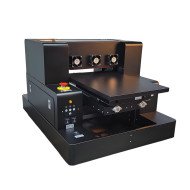
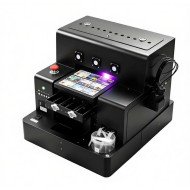
Infrastructure Integration Challenges of the Smart Mini A4 UV Printer for IT Managers

The Industrial Reality of Integrating Miniature UV Printers into Enterprise Environments
In contemporary IT infrastructure setups, space, thermal dissipation, and compliance with data center electrical standards pose nontrivial challenges when introducing new hardware. The Smart Mini A4 UV Printer, with its compact footprint and specialized UV curing technology, is designed for small-format industrial printing. However, deploying such devices at scale within existing enterprise print ecosystems demands a rigorous assessment beyond superficial specs.
Consider a technical operations center with 42U racks optimized for blade servers and network switches. The introduction of floor-standing peripheral devices, like UV printers, risks disrupting airflow patterns critical to maintaining sub-30°C operating temperatures. The UV curing units generate localized heat loads approximately 300 Watts during peak operation cycles, which, when combined with clustered deployments, can exacerbate thermal hotspots. The constrained space under racks complicates cabling and power supply arrangements, particularly since these devices require dedicated power lines to maintain stable voltage and mitigate electromagnetic interference (EMI) effects on nearby sensitive equipment.
Furthermore, the LED UV light sources emit specific wavelengths that may interfere with optical sensors deployed for environmental monitoring within data centers. Local safety regulations also mandate shielding and interlocks to prevent accidental UV exposure to personnel, adding to the hardware integration complexity. The Smart Mini A4 UV Printer’s operating noise levels, reported at approximately 65 dB(A), must also be considered within noise-sensitive workstations.
Moreover, the printer’s control interface, often designed as a USB or wireless dongle, requires network integration strategies that balance security with operational convenience. IT managers must ensure firmware and driver compatibility with enterprise-grade server OS versions and evaluate potential firmware update protocols that comply with strict change management policies. These factors collectively influence infrastructure readiness assessments and total cost of ownership projection.
Thermal Management and Power Distribution Considerations
Operating a UV printer involves managing both the primary printhead heat dissipation and the UV curing module's thermal output. The Smart Mini A4 utilizes a compact LED array for curing, which introduces a continuous heat flux estimated at 250 to 350 Watts during sustained printing. For a printer with dimensions approximately 300 mm width x 200 mm depth x 150 mm height and a mass near 7 kg, this power density is significant.
Calculating the thermal load inside a standard 1.5-meter-by-0.8-meter rack subsection reveals how cumulative heat can raise ambient air temperature by 3-5 °C without supplementary ventilation. This increment can reduce adjacent equipment mean time between failures (MTBF) due to accelerated component aging. IT managers must therefore plan for enhanced rack airflow mechanisms or establish isolated printer zones with dedicated exhaust systems.
Table comparing power and thermal management options for Smart Mini A4 UV Printer
| Parameter | Standard Setup | Enhanced Thermal Management |
|---|---|---|
| Peak Power Consumption (Watts) | 320 | 320 |
| Heat Dissipation Rate (Watts) | 300 | 300 |
| Ambient Temperature Rise Inside Rack (°C) | 4 | 1.5 (with airflow enhancement) |
| Additional Power for Cooling (Watts) | 0 | 150 (fan-based cooling system) |
| Estimated Noise Level (dB(A)) | 65 | 70 (due to fans) |
Compliance and Electromagnetic Interference Challenges
The UV printer electronics include high-frequency switching power supplies and LED driver circuits operating in the 20-50 kHz range, which can generate EMI impacting other rack devices. Shielding and proper grounding are required to comply with CISPR 32 Class B emissions standards common in enterprise environments.
Additionally, the printer’s light-emitting diodes emit UV-A wavelengths around 365 nm, necessitating containment measures to meet OSHA regulations for workplace UV exposure limits. Integrated interlock switches are mandatory to disable UV emission if access panels are opened, adding mechanical complexity and maintenance requirements.
Physical Footprint Constraints and Network Integration
The printer’s footprint of roughly 300 x 200 mm means it cannot be rack-mounted in the traditional sense, requiring dedicated shelf space or desk placement near the infrastructure. This spatial demand conflicts with high-density rack strategies aimed at maximizing computing power per square meter. Wiring for USB or Ethernet interfaces must contend with cable management best practices to avoid airflow obstruction and avoid tripping over cables in constrained workspaces.
Network integration often requires static IP addressing or advanced network segmentation to prevent unauthorized access. IT security policies may require dedicated VLANs and endpoint security agents to monitor printer firmware integrity and data transfer logs.
Maintenance and Firmware Update Protocols in Enterprise Infrastructure
Routine maintenance includes printhead cleaning, UV LED module replacement, and firmware updates. The latter must be performed within controlled maintenance windows to prevent unexpected downtime affecting production. Firmware rollback capabilities and secure update signing mechanisms are critical to mitigate vulnerabilities.
In an environment with multiple printers, centralized management consoles may be required to track device health metrics like printhead wear and UV lamp lifespan. Failure to integrate such monitoring could result in unplanned outages and productivity losses.
Scenario Analysis of Business Use-Cases Affected by Infrastructure Challenges
Use-Case 1: Small Print Shop in a Shared Workspace
With limited rack space and moderate IT infrastructure, thermal and EMI concerns are manageable. The Smart Mini A4 integrates with minimal adaptation, primarily requiring adherence to network security protocols and periodic firmware updates.
Use-Case 2: Enterprise Data Center with Distributed Print Stations
Deployment at scale risks cumulative thermal and EMI issues. Requires dedicated cooling solutions, shielded cabling, and custom rack shelves. Network segmentation and firmware update policies must align with strict IT governance.
Use-Case 3: Research Lab with High Compliance Standards
The UV printer’s safety interlocks and electromagnetic emissions require rigorous validation. Environmental monitoring sensors might need recalibration due to UV interference. Firmware updates are managed through centralized IT with strict audit trails.
Expert FAQ on Infrastructure Integration of Mini UV Printers
Q1 What are the optimal airflow rates to maintain printer longevity in rack environments?
An airflow rate of 40-60 cubic feet per minute (CFM) around the printer is recommended to maintain ambient temperatures below 30°C, extending LED lifespan by approximately 20% compared to stagnant air environments.
Q2 How does EMI from the UV LED driver affect adjacent sensitive devices?
High-frequency switching can induce voltage spikes reaching 5-10 mV on nearby signal lines, potentially causing data errors or resets unless shielded cables and isolated ground paths are implemented.
Q3 What are best practices for firmware updates in highly secure enterprise networks?
Use signed firmware images verified by hardware security modules (HSMs) with access control and version rollback to prevent malicious or accidental disruptions.
Q4 Can the printer be integrated with centralized print management software?
Yes, but integration requires vendor-specific APIs supporting SNMP or RESTful interfaces to allow real-time status monitoring and error reporting.
Q5 What power delivery specifications are recommended to ensure stable operation?
A dedicated single-phase power line rated at 240VAC, 10A with UPS backup is advised to prevent voltage sags that can disrupt LED curing consistency.
Strategic Verdict on the Smart Mini A4 UV Printer from an IT Infrastructure Perspective
While the Smart Mini A4 UV Printer offers precision UV curing in a remarkably small form factor, its integration into enterprise IT infrastructure presents multi-dimensional challenges. Thermal management, EMI compliance, physical footprint constraints, and secure network integration require careful planning and additional hardware adaptations. The device’s strong point is its compactness, but this advantage comes with tradeoffs in operational environment demands and maintenance complexity.
Future iterations would benefit from modular thermal solutions, enhanced EMI shielding, and standardized network integration protocols compatible with enterprise environments. As the industry moves towards increasingly convergent IT-printing environments, printers like the Smart Mini A4 must evolve to meet infrastructure expectations for reliability, security, and serviceability without compromising their specialized UV printing capabilities.