High Speed Selfie Coffee Printer Facing Infrastructure Integration Challenges in Clinical Detail
The Industrial Reality of Embedding a High Speed Selfie Coffee Printer into Enterprise Systems
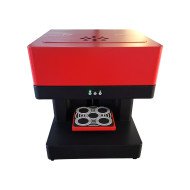
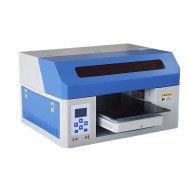
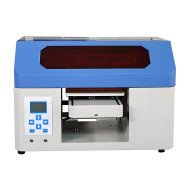
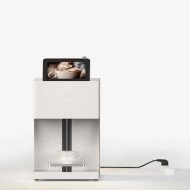
Integrating a high speed selfie coffee printer into existing commercial or industrial food service environments presents multiple infrastructure challenges. These challenges extend beyond simple device placement, touching on power supply consistency, communication protocols, physical workstation ergonomics, and network security compliance. The printer, designed to expedite and personalize coffee art via rapid inkjet or edible printing technology on foam or surface crema, demands precise synchronization with beverage dispensing machinery and enterprise workflow systems.
Consider a café chain attempting to implement this technology across 100 outlets with varied legacy hardware and inconsistent network architectures. Variations in 240V or 110V power supply stabilizers, differing Wi-Fi standards (802.11ac versus 802.11ax), and proprietary beverage machine interfaces can cause communication lags or outright failures under peak load. This risk escalates significantly when the printer’s firmware requires OTA updates or cloud connectivity for pattern rendering, creating a dependency on robust cybersecurity measures that many food service IT infrastructures are ill-equipped to handle.
Moreover, the printer's hardware footprint and environmental demands—precision dispensing heads requiring strict ambient temperature stability (22°C ± 2°C), humidity control below 60%, and vibration isolation—are often underestimated. These factors impact not only print quality but also maintenance cycles, uptime, and overall throughput, making infrastructure integration a key operational bottleneck rather than a trivial add-on.
System Architecture and Power Supply Requirements
The printer’s core component is a high-frequency piezoelectric printhead capable of ejecting edible ink droplets at volumes up to 10,000 drops per second, with droplet sizes as small as 10 picoliters. The printhead requires a stable direct current power supply of 24V ± 5% at 3 Amps continuous draw, with transient peaks reaching 5 Amps during printing bursts. These specifications necessitate regulated power conversion units (PCUs) with low noise and high transient response to avoid signal distortion and mechanical wear.
Comparing two power configurations—one with a switching power supply (SPS) integrated into the printer vs. centralized power distribution with remote AC/DC converters—reveals operational trade-offs. SPS integration reduces cable length and associated voltage drops but increases device weight and heat generation locally. Centralized power mitigates thermal load on the printer but introduces potential voltage drops over cable runs exceeding 5 meters, demanding thicker gauge wiring and complex power monitoring schemes.
Network Protocols and Data Security
For the selfie coffee printer to render custom images rapidly, it must communicate efficiently with front-of-house systems or mobile ordering platforms. Typical data payloads include high-resolution grayscale images encoded to dithering patterns executable by the printhead controller. Data transfer rates thus fluctuate between 2Mbps to 10Mbps depending on print resolution settings (standard 300 dpi to high fidelity 600 dpi).
Protocols supported include IEEE 802.11ac with WPA3 encryption and Ethernet with TLS 1.3 security layers. The printer’s embedded Linux OS requires hardened firewall rules and routine vulnerability patching to prevent man-in-the-middle attacks or unauthorized access. This creates a challenge for IT infrastructure managers responsible for ensuring compliance with PCI-DSS standards in payment-integrated environments. Network segmentation and VLAN allocation must be carefully planned to safeguard the printer without isolating it from essential backend services.
Environmental and Physical Deployment Constraints
The printer’s mechanical vibration tolerance is limited to under 0.5 m/s2 RMS over a frequency range of 5Hz to 200Hz, conditions typically satisfied only in dedicated beverage preparation zones exempt from heavy machinery or foot traffic vibration. This limits deployment options in high-turnover coffee shops or fast-food chains where equipment density is maximal. Furthermore, the operating temperature and humidity ranges necessitate HVAC system calibration to maintain constant environmental parameters, adding to facility operational overhead.
Physical size and modularity also impact infrastructure. The printer’s base footprint measures approximately 400 mm by 300 mm with a height of 350 mm, requiring stable mounting with anti-vibration feet anchored to countertops rated for dynamic loads of up to 15 kg. Cable management is critical; printhead and control unit cables must be shielded to minimize electromagnetic interference (EMI) from nearby espresso machines and refrigeration units.
Maintenance and Firmware Update Integration Challenges
Firmware updates are delivered OTA with dual-bank flash memory to allow rollback in the event of corrupted updates. However, the update process requires a minimum of 15 minutes of non-interruptible power and network connection. Interruptions lead to bootloader engagement modes requiring technician intervention.
From a maintenance perspective, the printer’s build-in diagnostics output detailed logs including droplet ejection voltage variance, nozzle clog rate statistics, and temperature sensor readouts. These must be integrated into existing monitoring dashboards (e.g., Nagios, Zabbix) via SNMP or RESTful APIs. Without seamless integration, maintenance leads face redundant manual steps, increasing downtime.
| Infrastructure Aspect | Integrated Switching Power Supply | Centralized Power Distribution |
|---|---|---|
| Weight Impact | +1.2 kg on device | No added weight |
| Heat Generation | +15 Watts on device | Centralized heat source |
| Cable Complexity | Minimal | Requires 5+ meter shielded cables |
| Voltage Stability | High near source | Potential 5% drop along cable |
| Maintenance Accessibility | Requires device disassembly | Centralized units easier to service |
Scenario Analysis of Business Use Cases and Infrastructure Impact
Independent Café with Limited Technical Support
A single-location artisan coffee shop implementing the printer faces minimal network complexity but must focus on power quality and environmental conditioning. Data security risk is low but uptime depends heavily on maintenance lead expertise to handle printhead clogging and manual firmware updates. Print throughput is modest, allowing for flexible scheduling of updates and maintenance.
Mid-Size Franchise with Networked POS Systems
Multi-location franchise benefits from centralized IT managing the printer fleet via VLAN design and scheduled firmware rollouts. Power infrastructure requires assessment for uniformity across stores. Automated alerts for printhead failures routed to maintenance teams reduce downtime, but integration with POS platforms demands rigorous protocol and security compliance audits.
Large-Scale Food Service Contractor Deploying at Event Venues
At high-volume venues, infrastructure integration focuses on rapid device swapping, standardized power modules with quick connect/disconnect capabilities, and robust wireless architecture to handle fluctuating bandwidth demand. Rigorous vibration isolation solutions are needed to maintain print quality amid heavy foot traffic and mechanical noise.
Expert FAQ on Integration Complexities of High Speed Selfie Coffee Printers
Q1: How critical is power supply ripple in affecting nozzle droplet ejection accuracy?
A1: Ripple exceeding 50 mV peak-to-peak can cause inconsistent droplet voltage modulation, resulting in size variance above 10%, impairing image fidelity.
Q2: What network redundancy strategies apply to minimize print job interruptions?
A2: Dual band Wi-Fi with automatic failover to wired Ethernet via PoE is recommended in enterprise environments.
Q3: How does ambient humidity impact ink drying rate and print stability?
A3: Humidity above 60% prolongs drying time beyond 5 seconds, increasing risk of smearing especially during high-speed throughput.
Q4: What are best practices for integrating printer diagnostics into existing system monitoring?
A4: Utilize standardized SNMP MIB extensions and RESTful API endpoints to funnel data into centralized monitoring tools.
Q5: Can firmware rollback be automated to reduce technician intervention?
A5: Limited to scripted sequences triggered by failed health checks during bootloader phase; requires customized deployment pipelines.
Strategic Verdict on Infrastructure Integration of High Speed Selfie Coffee Printers
Embedding high speed selfie coffee printers into complex food service environments reveals significant infrastructure integration challenges. Power stability, network security, environmental control, and maintenance interoperability are non-trivial bottlenecks. While the hardware advances printing speed and personalization, the indirect overhead in infrastructure readiness and operational reliability tempers immediate scalability. Future development should prioritize modular power architectures, hardened embedded systems with automated recovery, and standardized integration protocols to align the technology with broader enterprise ecosystem demands.