Mastering Commercial UV Printer Maintenance: Prevent Clogs and Boost Profitability

Mastering Commercial UV Printer Maintenance: Prevent Clogs and Boost Profitability
Investing in a commercial UV printer transforms your customization business, enabling high-margin printing on diverse materials like acrylic, wood, leather, and metal. Yet, the true difference between a thriving business and costly downtime isn't the upfront machine cost — it's the unwavering dedication to meticulous maintenance.
Commercial flatbed UV printers represent complex industrial machinery involving precise fluid dynamics, sensitive piezoelectric printheads, and photo-reactive polymers. Neglecting their upkeep risks nozzle blockages, subpar print quality, and expensive hardware failures, costing thousands and interrupting operations.
This comprehensive guide distills the science behind UV printer clogging, presents essential daily, weekly, and monthly maintenance protocols practiced by industry leaders, provides an effective troubleshooting framework, and highlights the advantages of smart hardware upgrades for seamless operation.
Part 1: Understanding UV Ink Chemistry and Threats to Your Printhead
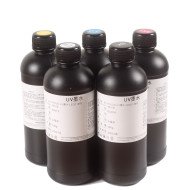
UV ink is a unique liquid monomer that cures instantly when exposed to specific wavelengths of high-intensity UV LED light, forming a durable polymer. Unlike water- or solvent-based inks, its instant curing is a double-edged sword — vital for versatility but demanding rigorous maintenance.
The key threats to your UV printhead include:
1. Ambient UV Light Exposure
Uncontrolled UV light, such as direct sunlight, strong fluorescent lighting, or reflections from shiny substrates, can prematurely cure ink inside nozzles, causing clogs. Proper shielding and controlled lighting environments are essential.
2. Pigment Settling in White Ink
White UV ink pigments, primarily titanium dioxide, are heavy and prone to sedimentation if not agitated. This sediment clogs ink lines and printheads, resulting in translucent prints and eventual printhead damage. Continuous or gentle manual agitation is critical.
3. Environmental Dust and Static Electricity
Printheads operate mere millimeters above substrates at high speed, making them highly susceptible to dust, lint, and static. Dust adheres to printheads; static can disperse ink droplets, causing blurred or inconsistent prints. Maintaining clean work areas with adequate humidity levels reduces these risks.
Part 2: Essential Daily Maintenance Routine
Your daily maintenance is the frontline defense against ink clogs and machine deterioration. Dedicate 5-10 minutes at shift start and end for these steps — skipping them risks expensive, irreversible damage.
Morning Startup Checklist
- Environmental Verification: Confirm room temperature is 15°C to 30°C (59°F to 86°F) and humidity is stable between 40% and 70%. Use humidifiers or heaters as needed to maintain ink viscosity.
- White Ink Agitation: If your system lacks automated stirring, gently swirl white ink bottles to prevent sediment without creating air bubbles.
- Automated Head Cleaning: Run a standard cleaning cycle via your printer interface to flush overnight static ink.
- Nozzle Inspection Print: Print a nozzle check pattern on transparent acrylic or specialized paper. Inspect closely under strong light to ensure continuous lines for all colors and varnish. Repeat cleaning until flawless.
End-of-Day Shutdown
- Clean the Wiper Blade: Use nitrile gloves and lint-free swabs with UV cleaning fluid to remove semi-cured ink from the blade, avoiding fiber contamination.
- Clean the Capping Station Rim: Ensure a perfect airtight seal by wiping dried ink off the rubber sealing surface.
- Printhead Parking Confirmation: Visually verify the printhead is securely docked on the capping station.
- Power Management: For machines with white ink circulation, keep main power on to allow automated stirring but switch off operational power.
Part 3: Weekly and Monthly Deep Maintenance
Weekly and monthly maintenance targets mechanical health and optical clarity, preventing long-term wear and print inconsistencies.
Weekly Tasks
- Encoder Strip Cleaning: Gently wipe the thin plastic encoder strip with isopropyl alcohol to remove ink mist without damaging microscopic marks essential for printhead positioning.
- Dampers Inspection: Check dampers for adequate ink volume and absence of air bubbles to avoid ink starvation caused by vacuum leaks.
- Printhead Surround Cleaning: Clean metal edges near the printhead with foam swabs and cleaning fluid; avoid touching the nozzle plate itself.
Monthly Tasks
- Lubricate Carriage Guide Rails: Remove gritty old grease before applying manufacturer-recommended light grease or oil. Move carriage manually to distribute lubricant evenly.
- Clean UV LED Lamp Glass: Wipe quartz glass with isopropyl alcohol to maintain UV light transmission, ensuring proper ink curing.
- Waste Ink Bottle Maintenance: Empty and properly dispose of waste ink per hazardous waste regulations to prevent spills and contamination.
Part 4: Long-Term Storage and Vacation Mode
UV printers require special care when offline for multiple days to prevent permanent nozzle clogs.
Step 1: Comprehensive Pre-Storage Cleaning
Complete all daily and weekly cleaning tasks meticulously, guaranteeing spotless capping stations and no residual ink crusts.
Step 2: Maintain Moisture Inside the Capping Station
Inject 2-3ml of UV moisturizing or cleaning solution into the cap sponge to create a humid micro-environment that prevents ink curing during downtime.
Step 3: Block External Light
Cover the entire machine with thick, opaque fabric to shield ink lines and printhead from ambient light, preventing unwanted curing.
For shutdowns exceeding 30 days, flush the entire ink system with dedicated UV flushing fluid to remove ink completely, preventing clogging and damage.
Part 5: Troubleshooting Common UV Printing Issues
| Symptom / Visual Issue | Likely Cause | Immediate Fix & Action Plan |
|---|---|---|
| Horizontal Banding / Visible Stripes | Clogged nozzles, incorrect printhead height, or poor feed calibration. | Run nozzle check and multiple cleaning cycles. Ensure substrate is flat and adjust head height to 2-3mm. |
| Ink Smearing or Head Strikes | Warped or lightweight material, failing height sensor. | Use vacuum table, tape warped edges, recalibrate infrared height sensor. |
| Weak or Missing White Ink | Settled titanium dioxide pigments from inadequate agitation. | Check white ink stirring system; manually pull fresh ink from damper if needed. |
| Sticky Prints or Poor Cure | Insufficient UV lamp intensity, dirty lamp glass, printing too fast. | Clean lamp glass, increase lamp power, reduce printing speed. |
| Blurry, Ghosting Images | Dirty encoder strip, printhead too high causing droplet drift. | Clean encoder strip cautiously; lower head to optimal 2mm distance. |
| Excessive Ink Overspray | Static buildup in low humidity environments. | Wipe substrate with anti-static cloth or alcohol; activate humidifier to raise humidity above 45%. |
Part 6: Why Upgrade to Smart, Automated Hardware?
If maintenance consumes more time than printing, outdated or budget printers may be to blame. Commercial-grade automated systems streamline white ink management, cleaning, and material handling, saving invaluable time and reducing costly downtime.
Introducing the GNFEI Advantage
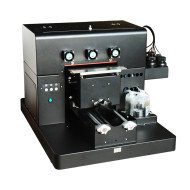
The GNFEI A3 Spot UV Printing Machine offers robust automation designed to eliminate common UV printing challenges:
- Automatic White Ink Agitation: Integrated CISS prevents pigment settling, protecting your printhead and ensuring consistently brilliant whites.
- Auto Cleaning & Nozzle Checks: Pre-print nozzle checks and cleaning cycles keep printheads pristine without operator intervention.
- Vacuum Platform: Securely holds warped or flexible materials flat, preventing printhead collisions.
- Automatic Height Detection: Infrared sensors adjust printhead position for perfect focus on substrates up to 15cm thick.
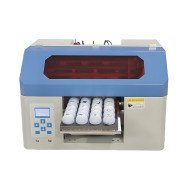
- Flat and Cylindrical Printing: Enables synchronized color and white ink printing on curved objects like bottles, expanding your product range.
By automating demanding maintenance tasks, this smart hardware empowers you to focus on creativity, marketing, and scaling your customization business profitably.
Conclusion: Safeguard Your Commercial UV Printer Investment
Your UV printer’s printhead is a precision instrument requiring strict cleanliness and environmental control. Adopting disciplined maintenance routines and investing in intelligent, automated equipment, like the GNFEI A3 Spot UV Printer, will protect your profits and build a resilient, world-class printing operation.
Print this guide, display the daily checklists prominently, and train all operators thoroughly. These simple habits reduce downtime, extend machine lifespan, and maximize your return on investment.