
The Ultimate Buyer’s Guide to Commercial UV Printers in 2026: ROI, Applications, and Expert Tips
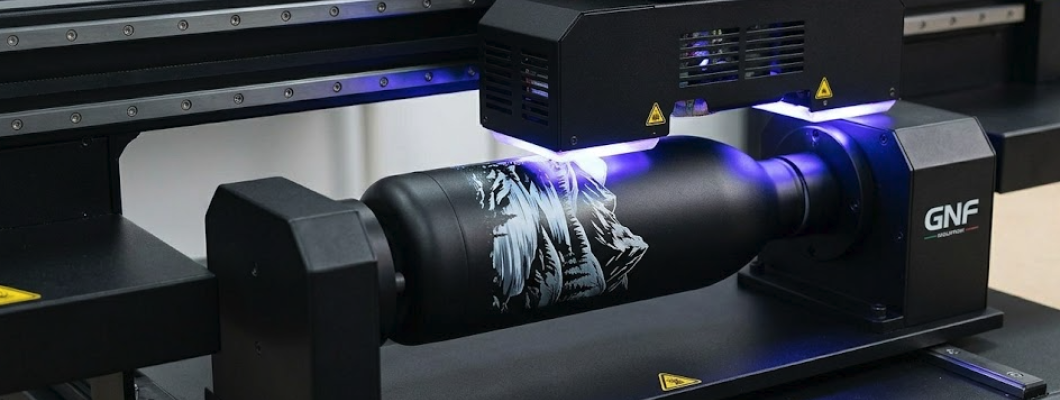
If you are in the custom printing industry or looking to start a highly profitable personalization business, you have likely heard the buzz around UV printers. Unlike traditional printing methods that restrict you to paper or specific fabrics, a commercial UV printer opens up a world of possibilities, allowing you to print high-resolution, durable graphics on almost any flat (or even cylindrical) surface.
But with industrial machines costing anywhere from a few thousand to tens of thousands of dollars, making the right investment is critical.
In this ultimate guide, we will break down exactly what a UV printer is, how it stacks up against other technologies like DTG and DTF, the most profitable items you can print, and the insider tips you need to know before buying your next (or first) machine.
How Does a UV Printer Work? The Magic of Instant Curing
At its core, UV (Ultraviolet) printing is a form of digital printing. But instead of relying on solvent inks that evaporate and dry over time, UV printers use specially formulated inks that are instantly cured (dried) by high-intensity UV LED lights mounted directly on the printhead carriage.
Here is why this instant curing process is a game-changer for commercial production:
Zero Drying Time: The moment the ink hits the substrate, the UV light hardens it into a solid polymer. You can pack and ship products immediately after printing.
Unmatched Versatility: Because the ink doesn't need to absorb into the material, you can print on non-porous surfaces like glass, metal, acrylic, plastic, wood, and ceramic.
Incredible Durability: The cured UV ink is scratch-resistant, waterproof, and highly resistant to fading from sunlight, making it ideal for both indoor and outdoor applications.
3D Textured Effects: Advanced UV printers can lay down multiple layers of clear gloss or white ink, creating embossed, raised textures (like braille or simulated oil paintings) that customers love.
UV Printer vs. DTG vs. DTF: Which Do You Need?
Many business owners get confused between UV, DTG (Direct-to-Garment), and DTF (Direct-to-Film) printing. While they all offer fantastic profit margins, they serve entirely different markets.
Here is the straightforward breakdown to help you choose:
1. UV Printers (The King of Hard Goods)
Best for: Rigid materials and promotional items. Applications: Phone cases, acrylic plaques, metal signs, golf balls, leather wallets, custom USB drives, and glass trophies. The Verdict: If your business model focuses on custom promotional products, corporate gifts, or rigid signage, a flatbed UV printer is the only machine you need.
2. DTG Printers (The Apparel Specialist)
Best for: High-quality, breathable prints on cotton fabrics. Applications: Premium custom T-shirts, hoodies, and tote bags (requires at least 80% cotton for best results). The Verdict: (Here you should insert an internal link to your A3 DTG Printer) If you are running a premium apparel brand and want the softest hand-feel on cotton garments, DTG is your go-to technology.
3. DTF Printers (The Fabric All-Rounder)
Best for: Transferring designs to almost any type of fabric. Applications: Polyester sportswear, dark nylon jackets, hats, and blended fabrics. The Verdict: DTF is the rising star in the textile industry because it bypasses the fabric restrictions of DTG, though the print has a slightly more plastic feel.
If your goal is to print on solid objects, ignore DTG and DTF. A commercial flatbed UV printer is your money-maker.
5 Critical Specifications to Check Before Buying a Commercial UV Printer
If you are browsing the market for a UV printer, it is easy to get overwhelmed by the technical jargon. Many beginners make the mistake of buying a cheap, bare-bones machine, only to realize it lacks the crucial features needed for professional, high-margin production.
Before you invest, ensure your chosen machine has these five critical capabilities:
1. Printhead Technology: Speed vs. Resolution
The printhead is the absolute heart of your UV printer. In the commercial A3 desktop category, Epson printheads are the gold standard for balancing stunning high resolution with reliability.
Epson L805: Excellent for ultra-high-resolution photo printing (up to 1440 dpi) and perfect for businesses prioritizing extreme detail over rapid mass production.
Epson XP600: The commercial workhorse. It offers a significantly higher printing speed while maintaining commercial-grade precision. If you plan to scale your business and handle larger daily volumes, upgrading to an XP600 head is highly recommended.
2. Varnish (Glossy Ink) Support for "Spot UV" and 3D Embossing
Standard UV printers only offer CMYK (Color) and White ink. However, if you want to charge premium prices for your products, you need a machine that supports Varnish (Glossy) Ink. Varnish allows you to create Spot UV effects—highlighting specific parts of a design with a shiny, reflective finish. By layering white ink and topping it with varnish, you can create stunning 3D embossed textures that customers can actually feel. This is the secret to producing premium custom phone cases, luxury business cards, and high-end acrylic awards.
3. White Ink Management (The "Anti-Clogging" Lifesaver)
Here is an insider secret: UV white ink contains titanium dioxide, a heavy pigment that easily settles at the bottom of the ink tank. If left stagnant, it will quickly clog your expensive printhead. Never buy a commercial UV printer without a White Ink Stirring System. A professional Continuous Ink Supply System (CISS) with an automatic stirrer ensures the white ink remains fluid and perfectly mixed, drastically reducing your maintenance time and saving you thousands of dollars in replacement printheads.
4. Vacuum Platform & Automatic Height Adjustment
Printing on a perfectly flat phone case is easy. But what happens when you need to print on a thin, lightweight piece of leather, or a slightly warped acrylic sheet? If the material lifts even a millimeter, the printhead will strike it, ruining the product and potentially damaging the machine. A Metal Tray with a Vacuum Platform sucks the material completely flat during the printing process. Paired with a Full Automatic Height Adjustment system, the printer uses infrared sensors to detect the exact height of the object (up to 15cm thick in top-tier A3 models) and adjusts the printhead automatically. This means zero manual guessing and zero head crashes.
5. Dual Functionality: Flatbed and Cylinder Printing
Why limit your business to flat objects? The custom drinkware market (water bottles, tumblers, mugs, wine bottles) is incredibly lucrative. Look for a machine that supports a rotary attachment. The best commercial units can print Color and White ink in the same pass on cylindrical objects (ranging from 2cm to 11cm in diameter), ensuring perfect color registration without the blurry edges caused by multi-pass printing.
Our Top Pick for 2026: The A3 Spot UV Printing Machine (Model F85V3)
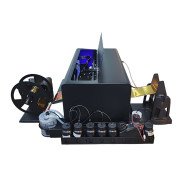
If you are looking for a machine that checks every single box mentioned above without the $20,000+ price tag of industrial floor models, the A3 Spot UV Printer (Model: F85V3) is arguably the best investment for customization businesses this year.
Engineered for precision and versatility, the F85V3 is not just a printer; it is a complete, automated production center. Here is why it stands out in the crowded A3 UV market:
True 3D Embossed & Spot UV Capabilities: Configured with CMYK + White + Varnish, this machine empowers you to offer premium, highly profitable textured finishes that standard CMYK printers simply cannot replicate.
Unmatched Versatility: Whether you are printing on a 15cm thick wooden box or a 2cm diameter glass bottle, the F85V3 handles it effortlessly. It seamlessly transitions from flatbed printing to cylinder printing.
Commercial-Grade Automation: Time is money in bulk printing. The F85V3 features full automatic tray movement and intelligent height adjustment. Once you set the height for a specific product batch, there is no need to re-detect the height for subsequent prints of the same item, drastically cutting down your production time.
Built for Speed and Precision: Powered by either the Epson L805 or the high-speed XP600 printhead, it delivers breathtaking 1440dpi resolution. You can finish a stunning A3-sized photo image in just about 173 seconds.
Smart Maintenance Systems: Equipped with an integrated White Ink Stirring System, Auto Nozzle Checking, and an Auto Nozzle Cleaning system, the F85V3 practically maintains itself, ensuring your printhead stays protected and your ink flows smoothly.
The Professional's Vacuum Bed: The built-in metal vacuum platform guarantees that even the most difficult, lightweight substrates stay perfectly flat during the printing process.
Ready to scale your customization business and offer premium Spot UV products?
Click here to explore the full specifications and pricing of the A3 Spot UV Printing Machine How to Maintain Your UV Printer to Prevent Clogging (The Ultimate Anti-Clogging Guide)
Let’s be honest: the printhead (whether it’s the Epson L805 or the blazing-fast XP600) is the most expensive and delicate component of your UV printer. The number one fear for new owners is printhead clogging, usually caused by dried UV ink.
However, with the automated systems built into modern machines like the F85V3 and a few simple daily habits, clogging is 100% preventable. Here is the ultimate maintenance checklist:
1. Control Your Environment (The Golden Rule)
UV ink is highly sensitive to extreme temperatures and dry air. If your workshop is too hot, the ink thickens; if it is too dry, static electricity will cause ink spray and banding. The Sweet Spot: Always keep your printer in a climate-controlled room. The ideal operating temperature is 15℃-30℃ (59℉-86℉), with a relative humidity of 40%-70%. Investing in a cheap digital hygrometer and a small room humidifier will save your printhead.
2. The Daily Nozzle Check
Never start a production run without doing a nozzle check. Advanced machines feature an Auto Nozzle checking and cleaning system. Make it a habit: The first thing you do every morning is run a quick nozzle test on a scrap piece of acrylic. If you see broken lines, run the automated cleaning cycle. It takes less than two minutes and guarantees flawless prints for your paying customers.
3. Let the White Ink Stirring System Do Its Job
As mentioned earlier, white ink pigment settles quickly. If your machine has a White Ink Stirring System (like the F85V3), keep the printer powered on (even in standby mode) so the stirrer can periodically agitate the ink. If you turn the machine completely off at the wall, the stirring stops, and the ink will settle in the lines.
4. Weekend and Holiday Shutdown Procedures
Leaving your printer idle over the weekend without preparation is a recipe for disaster. If you will not be printing for more than 48 hours:
Ensure the printhead is perfectly parked on the capping station (this creates an airtight seal preventing the UV light and air from curing the ink on the nozzles).
If shutting down for an extended holiday, use specialized UV cleaning fluid to flush the ink lines and the printhead. Never use water or alcohol, as they will react with the UV ink and instantly destroy the head.
Frequently Asked Questions (FAQ) About Commercial UV Printers
When clients look to invest in UV technology, they usually have a few specific questions. Here are the answers you need to make an informed decision:
How much does it cost to print a custom phone case or golf ball?
The profit margins in UV printing are astronomical because the ink cost per item is pennies. A standard full-color design on a smartphone case uses less than $0.05 worth of UV ink. If you sell that custom case for $20 to $30, your ROI (Return on Investment) is incredibly fast.
Do I need to apply a special coating (primer) before printing?
It depends on the material. For porous materials like wood, leather, or matte plastics, UV ink adheres perfectly without any preparation. However, for highly reflective or extremely smooth surfaces like glass, glazed ceramic, or polished metal, wiping the surface with a specialized UV adhesion promoter (primer) before printing ensures the ink bonds permanently and passes the scratch test.
Is the Acro RIP Software difficult to learn?
Not at all. The Acro RIP Software included with top-tier machines is the industry standard for a reason. It is designed with a highly visual interface that makes it easy to manage your color channels, adjust the density of your white ink base, and set up your glossy varnish layers. If you can use basic photo editing software, you can master Acro RIP in a few hours.
Is UV ink toxic or dangerous to use indoors?
Liquid UV ink contains chemicals that should not touch your skin (always wear standard nitrile gloves when refilling ink bottles). However, once the ink is instantly cured by the LED UV lamp, it becomes a completely safe, solid polymer. That said, the curing process does produce a slight odor. It is highly recommended to operate the printer in a well-ventilated room or near an extraction fan.
Conclusion: Start Your Highly Profitable UV Printing Business Today
Investing in a commercial UV printer is one of the fastest ways to enter the lucrative customization market. By choosing a machine that offers Spot UV Varnish, a Vacuum Platform, and White Ink Stirring—like the A3 F85V3—you bypass the limitations of cheaper desktop models and instantly unlock the ability to produce premium, high-margin products.
Whether you are printing 3D embossed phone cases, custom cylindrical tumblers, or luxury acrylic signage, the right UV printer will pay for itself in record time.













Leave a Comment