
Comprehensive Guide to UV Printers: Innovations and Applications
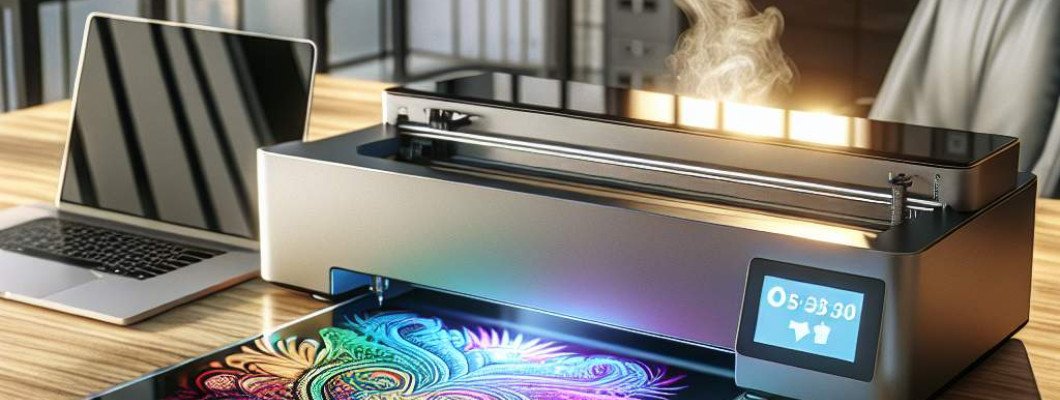
Are you struggling to find a reliable way to print vibrant, durable designs on a variety of surfaces? Have you heard about UV printers but aren't sure how they can revolutionize your business or hobby projects? If so, you're not alone. Many entrepreneurs, artists, and manufacturers are turning to UV printing technology for its unmatched versatility and high-quality results. Exploring the potential of a UV printer can open up new opportunities for creative expression and commercial success.
UV printers are transforming the printing landscape by enabling users to print directly onto a wide array of materials—from plastics and glass to metals, wood, and even textiles. Unlike traditional printers that rely on inks that soak or bleed into materials, UV printers use ultraviolet light to instantly cure special inks upon contact. This rapid curing process ensures vibrant, sharp images with excellent adhesion and durability, making UV printing ideal for both indoor and outdoor applications.
What Makes UV Printers Stand Out?
- Versatility in Materials: UV printers can print on almost any rigid or flexible surface, including complex shapes and curved objects. This means fewer limitations and more creative freedom.
- High Resolution and Color Accuracy: With resolutions that often exceed 1200 dpi, UV printers produce crisp, detailed images with vibrant colors, perfect for branding, artworks, or intricate designs.
- Fast Production: Instant curing means quicker turnaround times, reducing wait times in production lines or personalized gift shops.
- Environmental Benefits: UV inks emit fewer VOCs (volatile organic compounds), making them safer for the environment and workplace health.
- Long-Lasting Results: The cured inks are highly resistant to scratches, UV fading, and chemicals, ensuring your prints last longer without deterioration.
Common Applications of UV Printing Technology
UV printers are embraced across multiple industries due to their flexibility and quality. Here"s a look at some typical use cases:
- Signage and POS Displays: Produce colorful, durable signs for both indoor and outdoor use that can withstand weather exposure.
- Product Customization: Create personalized items like phone cases, accessories, and promotional products with full-color images or text.
- Interior Design and Decor: Print on tiles, glass panels, wood, or acrylic to create custom wall art, furniture accents, and decorative objects.
- Jewelry and Fashion: Add intricate designs directly onto jewelry pieces, watches, or clothing accessories for unique looks.
- Packaging and Labels: Produce premium labels with complex designs, metallic effects, or textured finishes that stand out.
Choosing the Right UV Printer for Your Business
Before investing in a UV printer, consider these factors to ensure it meets your specific needs:
- Print Size and Area: Know the maximum dimensions of objects you plan to print on. Larger formats open up more possibilities but may come at a higher cost.
- Print Speed: Evaluate your production volume. Some UV printers can print faster while others prioritize intricate detail.
- Color Capabilities: Check if the printer supports multi-layer or white ink printing for complex designs or transparent substrates.
- Ease of Maintenance: Investing in equipment with accessible maintenance routines reduces downtime and prolongs equipment lifespan.
- Budget: Balance your investment with expected ROI. Entry-level models suffice for small businesses, while industrial-grade printers excel in high-volume environments.
Maximizing the Benefits of UV Printing
To get the most out of your UV printer, follow these expert tips:
- Use the Right Inks: Match ink types with your material for optimal adhesion and color quality. Consider dual-cure or specialty inks for specific effects.
- Optimize Design Files: Prepare high-resolution images, and consider vector formats for crisp results. Pay attention to color profiles suited for UV printing.
- Maintain Proper Environment: Keep the printing area clean, dust-free, and within recommended temperature and humidity ranges for consistent quality.
- Perform Regular Maintenance: Clean print heads and replace filters periodically to prevent clogs and ensure consistent ink flow.
- Experiment with Effects: Use layering, masking, or textured inks to create visually striking effects and add value to your products.
Real-Life Success Stories
Imagine a small art studio that started printing custom canvas prints using a UV printer. After a few months, they expanded into personalized home decor, producing vibrant, scratch-resistant wall art. Their sales increased, and they gained recognition for premium quality and unique designs. This example illustrates how UV printing isn't just a new tool—it's a game-changer for creative entrepreneurs and businesses aiming to stand out in competitive markets.
Frequently Asked Questions
- Can UV printers print on flexible materials? Yes, many UV printers are capable of printing on both rigid and flexible surfaces, including plastics, vinyl, and fabrics, depending on the model.
- What are the main differences between UV printing and traditional inkjet printing? UV printing cures ink instantly with ultraviolet light, allowing it to adhere to non-porous surfaces and produce sharper, more durable images compared to conventional inkjet printers that rely on absorption into paper or fabric.
- Is UV printing environmentally friendly? Generally, yes. UV inks emit fewer VOCs, and the instant curing reduces waste. However, proper disposal of inks and cleaning chemicals is necessary for eco-conscious operation.
- How expensive is a UV printer? Prices vary widely based on size, features, and brand, ranging from a few thousand dollars for small commercial units to over $100,000 for high-end industrial models. Consider your production needs and ROI when choosing.
- What materials can I print on with a UV printer? Almost any surface—including glass, metal, wood, plastics, and ceramics—provided the surface is suitable for ink adhesion and curing.



















Leave a Comment